tracebloc: Engineer's Guide
Kubernetes-native platform for federated learning without data exposure

Asad Iqbal
February 17, 2026
12 min
Federated learning unlocks value from data that can't be centralized—training models across distributed locations, sensitive datasets, or multi-party collaborations while keeping data in place.
It's particularly powerful for vendor evaluation: benchmark external ML models against proprietary data without sharing it, or train models across geographically distributed datasets without violating data residency requirements.
The challenge is implementation. Building federated infrastructure from scratch means orchestrating distributed model training, handling edge failures, aggregating weights across heterogeneous environments, and maintaining security controls throughout. Most teams either spend months building custom solutions or leave valuable datasets unused.
tracebloc provides federated learning as a managed platform. Deploy via Helm charts, and the system handles edge orchestration, weight aggregation, fault tolerance, and compliance logging. Data scientists work through a familiar SDK: upload models, configure training plans, launch experiments—while the platform manages the distributed coordination. External vendors submit models that execute entirely inside your infrastructure, with results appearing in configurable leaderboards.
This guide explains the architecture, supported workflows, and what engineering teams can build with the platform.
Architecture and security model
tracebloc deploys as a Kubernetes application via Helm charts and runs fully within your infrastructure perimeter. External models execute in isolated pods, ensuring all training and inference occur locally within the distributed system.
Data never leaves your environment because the platform is built around structural safeguards:
- Kubernetes-native pod isolation
- Encryption in transit and at rest
- Encrypted model binaries and weights
- Fine-tuned weights remain on-prem
- Support for sovereign, outbound-only deployments with defined, auditable ingress and egress
- The result is: external model evaluation with the same security posture as internal workloads.
Governance and compliance
Every operation within the platform is logged and auditable. Actions ranging from model access to system events are recorded in formats aligned with GDPR, ISO 27001, and EU AI Act requirements.
Administrators can configure:
- Vendor whitelisting and granular access controls
- Compute budgets per vendor (runtime or FLOPs)
- Use-case-specific permissions
- Package and dependency policy enforcement
- Global pause controls for security review These controls provide full visibility into experiments while ensuring organizational policies are enforced automatically.
Evaluation and benchmarking
tracebloc is designed around use-case-driven benchmarking. Teams define their own metrics—accuracy, F1, latency, energy consumption, or domain-specific KPIs—and every submission is evaluated under identical conditions using the same data, hardware, and configuration.
Before execution, models are validated against enterprise policy requirements to ensure compatibility. Results appear in configurable leaderboards that make comparisons transparent, reproducible, and directly relevant to the real problem being solved.
Competition and leaderboard system
Under the hood, the benchmarking layer is built on a full competition management system designed for structured vendor evaluation:
- Competitions follow a lifecycle of draft, published, and archived states, with admin controls at each stage.
- Scoring formulas are configurable per competition, not limited to fixed metrics. Administrators define how submissions are ranked based on the KPIs relevant to their use case.
- Daily inference limits can be set per participant to control resource consumption during evaluation periods.
- Teams can be formed, merged, and managed within competitions. Participants join through controlled invitation flows, and team membership determines leaderboard grouping.
- Each competition is tied to a specific dataset with separate train and test splits, an industry tag, and a task type category, ensuring submissions are evaluated in their proper context.
For engineering teams evaluating multiple vendors against the same problem, this structure provides a repeatable and auditable comparison framework rather than ad-hoc benchmarking.
Supported task types and frameworks
One of the first questions engineers ask when evaluating a platform is: does it support my use case? tracebloc covers a broad range of ML domains and frameworks out of the box.
Task categories
The platform natively supports ten task categories across computer vision, natural language processing, tabular data, and time series:
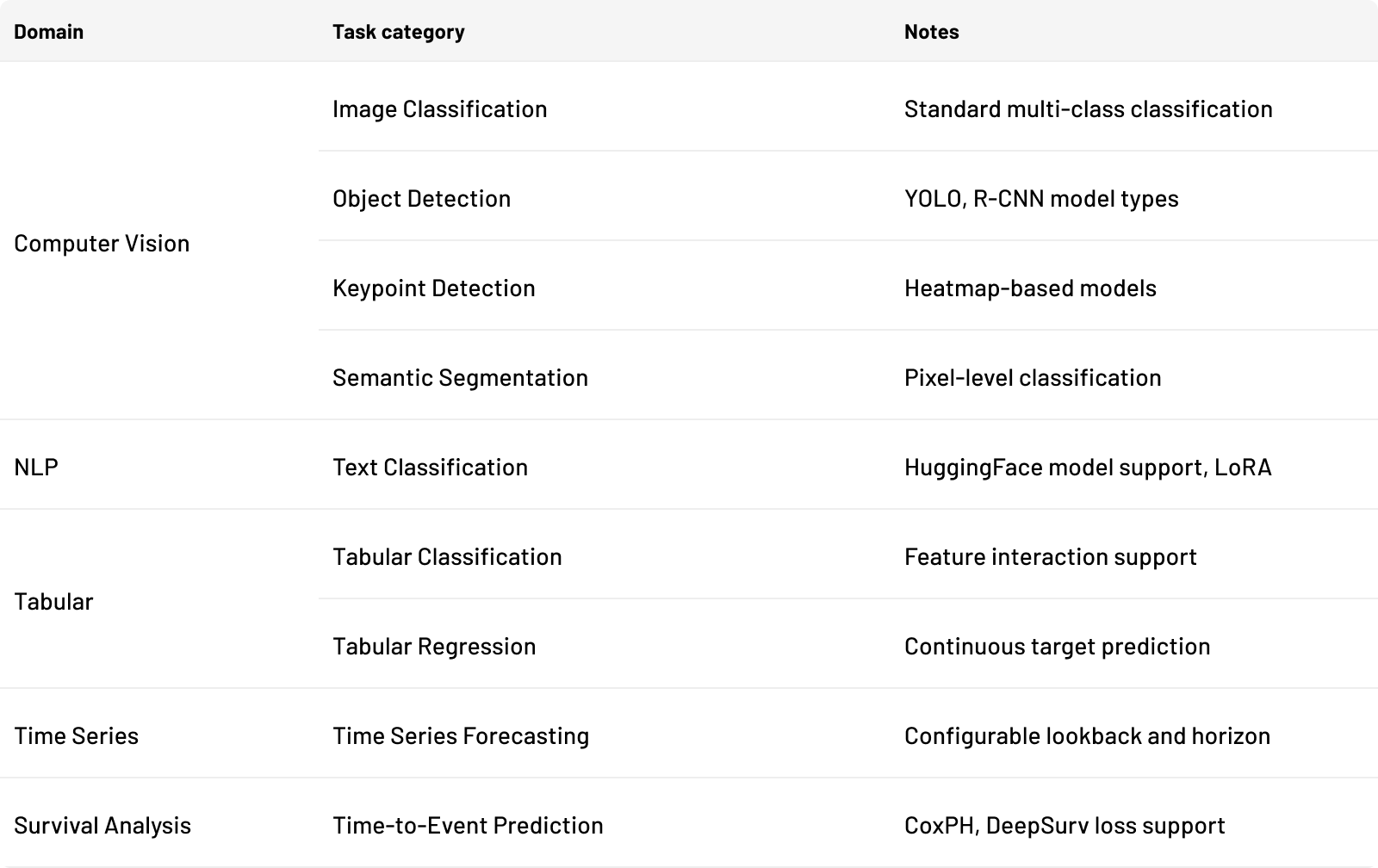
Each task category can be implemented using one or more of the following frameworks:
- PyTorch — deep learning across all CV, NLP, tabular, and time series tasks
- TensorFlow — full support for training, fine-tuning, and custom loss functions
- scikit-learn — classical ML models including linear, tree, ensemble, SVM, naive Bayes, XGBoost, CatBoost, and LightGBM
- Lifelines — survival analysis models (CoxPH and related)
- scikit-survival — additional survival analysis estimators
Custom containers are also supported for workloads that require dependencies beyond these frameworks.
Recognized model types
The platform validates and optimizes execution based on recognized model architectures. For object detection, both YOLO and R-CNN pipelines are supported. For tabular data, the system recognizes linear models, tree-based models, ensemble methods, SVMs, neural networks, XGBoost, CatBoost, LightGBM, naive Bayes, and clustering models. Each type is tagged on upload and used to configure the appropriate training pipeline.
Training capabilities
External partners can train or fine-tune models directly inside the secure environment. Supported workflows include:
- Full training and fine-tuning
- Parameter-efficient methods such as LoRA and adapters
- Hyperparameter search and ensembles
- Custom pipelines
The platform supports PyTorch, TensorFlow, and custom containers, with workloads scheduled across CPU, GPU, or TPU compute resources through Kubernetes. For deep learning models requiring distributed training of large language models or other compute-intensive architectures, the platform can leverage optimized frameworks such as DeepSpeed, which enables efficient distributed AI model training across multiple GPUs and multiple machines. Advanced parallelization strategies including pipeline parallelism and tensor parallelism are supported for training larger models that cannot fit on a single machine.
For organizations with geographically distributed datasets, federated learning enables distributed model training across multiple locations while keeping data local to each site.
Training plan configuration
Every experiment is governed by a training plan that gives the submitting data scientist full control over how their model is trained. The following parameters are configurable through the SDK:
Core training parameters
- Epochs number of passes over the data per training round (default: 10 for deep learning, 1 for scikit-learn)
- Cycles number of federated rounds, where each cycle trains locally then aggregates weights across edges (default: 1 for deep learning, 5 for scikit-learn)
- Batch size configurable per experiment; larger batch sizes can improve throughput when training across multiple devices
- Validation split automatically calculated based on the smallest edge's data, adjustable between the computed minimum and 0.5
- Seed optional global random seed for reproducibility Hyperparameters
- Optimizer Adam, AdamW, SGD, RMSprop, Adadelta, Adagrad, Adamax, Nadam, FTRL (framework-dependent)
- Learning rate constant, adaptive (with TensorFlow schedulers such as ExponentialDecay), or custom Python function
- Loss function standard options (MSE, cross-entropy, CoxPH, L1) or a custom loss function provided as a Python file, which is validated via a small training loop before the experiment begins
- Layer freezing specify layers by name to freeze during training (TensorFlow) Callbacks
- Early stopping halt training when a monitored metric (accuracy, loss, val_loss, val_accuracy) stops improving
- Reduce LR on plateau reduce learning rate by a configurable factor when a metric stagnates
- Model checkpoint save the best model weights during training
- Terminate on NaN stop immediately if loss becomes NaN
Data augmentation (computer vision tasks)
For image-based tasks, augmentation parameters are configurable directly in the training plan: rotation range, width and height shift, brightness range, shear range, zoom range, channel shift, fill mode, horizontal and vertical flip, and rescale factor.
LoRA for LLM fine-tuning
For text classification tasks using HuggingFace models, parameter-efficient fine-tuning is supported through LoRA with the following configurable parameters:
- lora_r rank of the low-rank adaptation matrices (default: 256)
- lora_alpha scaling factor (default: 512)
- lora_dropout dropout rate for LoRA layers (default: 0.05)
- q_lora enable quantized LoRA for reduced memory usage (default: false)
LoRA configuration is validated before experiment launch by running a small training loop to confirm compatibility with the uploaded model.
Time series parameters
Time series forecasting tasks expose additional configuration:
- Sequence length : the lookback window (number of past time steps used as input)
- Forecast horizon : number of future steps to predict
- Scaler : MinMaxScaler, StandardScaler, RobustScaler, MaxAbsScaler, Normalizer, QuantileTransformer, or PowerTransformer
Feature engineering
For tabular datasets that allow feature modification, the SDK provides a feature interaction API. Data scientists can create derived features by specifying interaction methods between columns (e.g., ratios, products, differences), as well as include or exclude specific features from training. Available features and methods are retrieved dynamically from the dataset schema.
How federated training works
Core concepts
- Edges each data-holding location (a site, device, or cluster partition) is registered as an edge. The platform tracks edge health, available compute resources, and local dataset size.
- Cycles a cycle is one federated round. In each cycle, the current global model is sent to all participating edges, trained locally for the configured number of epochs, and the resulting weights are returned for aggregation.
- Epochs within each cycle, the model trains for the specified number of epochs on each edge's local data. With 3 cycles and 10 epochs, the model trains 10 epochs locally three times, with aggregation between each round.
Weight aggregation
After each cycle, trained weights from all edges are collected and aggregated by a dedicated averaging service. The service supports both PyTorch and TensorFlow weight formats and produces a new global model that is distributed for the next cycle. This collective communication mechanism ensures synchronized updates across all participating nodes in the distributed system.
Data distribution
The platform calculates data distribution across edges automatically. When a training plan is created, the backend determines how many samples each edge holds per class, computes the minimum viable validation split based on the smallest edge, and distributes training accordingly. Each node trains on its local batch of data before weights are aggregated. Sub-dataset selection is supported, allowing data scientists to specify how many samples per class should be used from each edge.
Experiment lifecycle
Each experiment progresses through a defined state machine:
- In Queue experiment submitted, awaiting resource allocation
- Running local training in progress on edges; training jobs distributed across available nodes
- Averaging weights collected, aggregation in progress
- Completed final global model available for download
- Paused / Stopped / Abort administrator-controlled states for review or cancellation
Updated weights are available for download once training completes.
Model requirements and validation
An important practical question for any engineer submitting a model: what does the platform expect?
Model file format
Models are submitted as Python files (.py) or, in some cases, as zip archives containing model code and dependencies. The model file must be importable and expose the architecture so the platform can perform automated validation.
Validation pipeline
On upload, every model goes through an 8-step validation pipeline that checks:
- The model file can be loaded and the architecture is parseable.
- The declared framework matches the model implementation.
- Output dimensions match the target dataset (number of classes, feature points, or forecast horizon depending on task type).
- Input shape is compatible with the dataset (image size, number of tabular columns, sequence length, or number of keypoints).
- The model type is recognized (e.g., YOLO vs. R-CNN for object detection, linear vs. tree for tabular).
- Model parameter count is within the platform's limit (currently 3 billion parameters).
- For custom loss functions, a small training loop is executed to verify the loss computes without error.
- For LoRA configurations, a small training loop validates that adapter layers attach correctly.
If validation fails, the upload is rejected with a descriptive error message indicating which check failed and what the expected values are.
Dataset linking
After uploading a model, it must be linked to a dataset. During linking, the platform verifies compatibility between the model and dataset:
- For classification tasks: the number of output classes must match.
- For tabular and keypoint tasks: the number of feature points or columns must match.
- For time series: the sequence length and number of input columns must be compatible.
If there is a mismatch, the SDK displays the expected parameters from the dataset alongside the model's parameters, so the data scientist can adjust accordingly.
Data ingestion
Prebuilt ingestion pipelines support common dataset formats. Training and test data are stored in Kubernetes persistent volumes so datasets, logs, and artifacts persist across pod restarts.
Throughout the process, raw data remains inside the cluster. Only metadata is exposed to the interface layer.
Ingestion framework
The data ingestion layer provides a config-driven framework with ready-made templates for each supported task type. The core pattern is:
Code Blockpython1234567891011121314151617181920from tracebloc_ingestor import Config, Database, APIClient, CSVIngestorfrom tracebloc_ingestor.utils.constants import TaskCategory, Intent, DataFormatconfig = Config()database = Database(config)api_client = APIClient(config)ingestor = CSVIngestor( database=database, api_client=api_client, table_name=config.TABLE_NAME, data_format=DataFormat.IMAGE, category=TaskCategory.IMAGE_CLASSIFICATION, csv_options={"chunk_size": 1000, "delimiter": ","}, label_column="label", intent=Intent.TRAIN,)with ingestor: failed_records = ingestor.ingest(config.LABEL_FILE, batch_size=config.BATCH_SIZE)
Both CSV and JSON ingestors are available. For tabular data, schemas can be defined explicitly with column types. For image data, options such as target size and allowed file extensions are configured at the ingestor level.
Built-in validators
The ingestion pipeline includes a chain of validators that run automatically during data import:
- File validation verifies file existence, extensions, and read access
- Image validation confirms image dimensions, format, and integrity
- Duplicate detection flags duplicate records based on configurable keys
- Numeric column validation ensures numeric columns contain valid data
- Time format and ordering validation verifies timestamps are parseable and correctly ordered (for time series)
- XML annotation validation validates annotation files for object detection datasets (e.g., Pascal VOC format)
Templates are provided for all ten task categories, each preconfigured with the relevant validators and data format options. The ingestion framework is containerized with Docker support and can be deployed as a Kubernetes job.
Deployment and scalability
tracebloc is infrastructure-agnostic and can run on:
- Bare metal
- Private, public, or hybrid cloud
- Managed Kubernetes services
Once deployed, the platform can launch hundreds of isolated training or inference pods in parallel at large scale. Each runs in its own namespace for fault tolerance, autoscaling, and resource isolation. Compute or inference quotas can be defined per vendor to maintain control over resource usage.
Developer integration
tracebloc integrates into existing engineering workflows rather than replacing them. Available interfaces include:
- Python SDK for programmatic control
- Notebook environments with reference workflows
- A model repository with baseline architectures
- A web interface for use-case and vendor management
SDK workflow
The Python SDK provides the primary programmatic interface. The full workflow from authentication to experiment launch follows this pattern:
Code Blockpython123456789101112131415161718192021222324252627from tracebloc import User# Authenticateuser = User(environment="production")# Prompts for email and password# Upload a model (with optional pretrained weights)user.uploadModel("my_resnet_model", weights=True)# Link model to a dataset and get a training plan objectplan = user.linkModelDataset("dataset-abc-123")# Configure training parametersplan.experimentName("ResNet50 fine-tune on manufacturing defects")plan.epochs(50)plan.cycles(3)plan.optimizer("adam")plan.learningRate({"type": "constant", "value": 0.0001})plan.lossFunction({"type": "standard", "value": "crossentropy"})plan.validation_split(0.2)# Add callbacksplan.earlystopCallback("val_loss", patience=10)plan.reducelrCallback("val_loss", factor=0.1, patience=5, min_delta=0.0001)# Launch the experimentplan.start()
On successful launch, the SDK returns an experiment key and a direct link to the experiment in the web interface. The training plan details are printed for confirmation.
LoRA fine-tuning workflow
For LLM fine-tuning with LoRA, the SDK extends the standard workflow:
Code Blockpython1234567891011121314151617plan = user.linkModelDataset("text-dataset-456")plan.enable_lora(True)plan.set_lora_parameters( lora_r=128, lora_alpha=256, lora_dropout=0.05, q_lora=False)plan.start()
The platform validates the LoRA configuration against the uploaded model before launching the experiment.
Time series workflow
Time series forecasting tasks have additional configuration options:
Code Blockpython12345plan = user.linkModelDataset("sensor-timeseries-789")plan.sequence_length(24) # 24 past time steps as inputplan.forecast_horizon(12) # predict 12 steps aheadplan.scaler("StandardScaler")plan.start()
Example notebooks demonstrate the full lifecycle for each supported task type, allowing data scientists to operate within familiar tooling without managing Kubernetes or infrastructure details.
Vendor onboarding is handled through controlled access assignment and use-case permissions.
Sustainability tracking
tracebloc includes built-in sustainability metrics as a first-class feature, not just an optional KPI. Every experiment automatically tracks:
- FLOPs utilization total floating-point operations consumed during training, tracked per edge and per experiment
- Estimated gCO2 carbon emissions estimated per experiment based on compute usage and regional carbon intensity data
- Carbon intensity grid-level carbon intensity data associated with each edge's location
- Resource monitoring CPU, GPU, and memory utilization tracked per batch and aggregated per experiment
These metrics are available in the web interface and through the API, enabling engineering teams to include energy consumption and carbon footprint data in their model evaluation criteria. For organizations with ESG reporting requirements, the platform provides auditable sustainability data at the experiment level.
Summary
tracebloc turns proprietary data from a locked asset into an active resource by bringing AI models to the data instead of exposing the data itself. The platform combines federated learning architecture, enterprise governance, and scalable infrastructure to enable secure external collaboration without sacrificing control.
For engineering teams, this means a practical path to evaluating and deploying external AI capabilities while maintaining full ownership of data, compliance posture, and infrastructure.
The platform supports ten task categories across vision, NLP, tabular, and survival analysis workloads, with five frameworks including PyTorch, TensorFlow, scikit-learn, Lifelines, and scikit-survival. The SDK provides a clear workflow from model upload to experiment launch, with rich configuration options for hyperparameters, augmentation, LoRA fine-tuning, and feature engineering — all executed securely inside your infrastructure.